

Almost everything I run sits behind one Hostinger login: this blog, a second blog and my agency site on a shared plan, and a small VPS on a separate plan in the same account. So this is less a review than an inventory of the hosting I use every day, and it starts with the one thing about it I had wrong until September 2026: I thought my blogs were cached.
What the headers actually said
HTTP/1.1 200 OK
X-Powered-By: PHP/8.3.33
Server: LiteSpeed
alt-svc: h3=":443"; ma=2592000, h3-29=":443"; ma=2592000
Content-Security-Policy: upgrade-insecure-requests
That is trimmed, but nothing relevant has been removed. LiteSpeed is the web server, PHP 8.3.33 is what my pages are built by, and the header I was looking for, x-litespeed-cache, is simply absent. Same story on the second blog I keep on the same account.
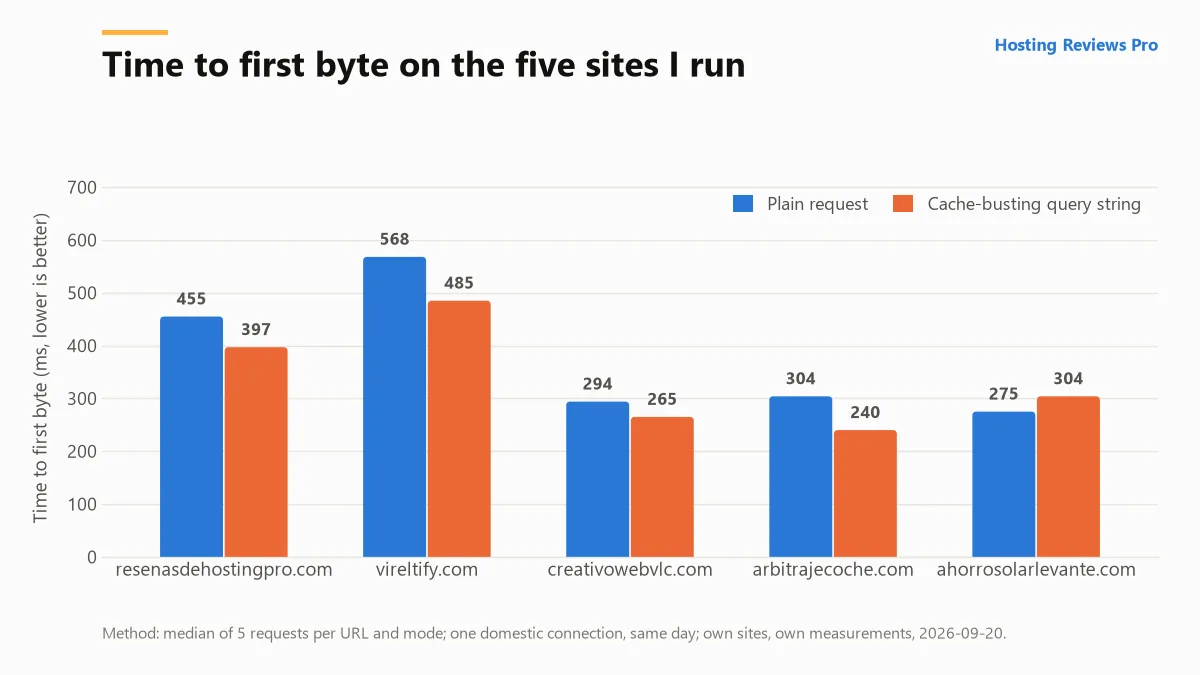
The timings agree with the headers. Five requests to the homepage from home fibre in Valencia, Spain, on 20 September 2026 gave a median time to first byte of 0.455 s; the same five with a cache-busting query string gave 0.397 s. Forcing past a cache should cost time. Here it cost nothing, because there was nothing to force past.
This is not Hostinger breaking a promise. Page caching on a WordPress install is a plugin decision, and on my sites nobody had made it, me included. But it is the sort of thing a shared host is happy to leave quiet, and if you assumed the same as I did, go and check yours before you read another word. The before-and-after, measured the same way, goes into the notebook I am keeping on caching this blog.
What is on the account
- This blog, WordPress, on the shared plan.
- A second blog of mine, WordPress, same plan.
- My agency site, static HTML rather than WordPress, also on the shared plan but served through Hostinger’s CDN: it answers with
Server: hcdnwhere the two blogs answer withServer: LiteSpeed. - A VPS, the KVM 1, running a small Node and Express app behind Caddy. Same login, completely different job.
The CDN difference showed up in the numbers: the agency site returned a median TTFB of 0.294 s against 0.455 s and 0.568 s for the two blogs. I would love to present that as proof the CDN is doing work, and it might well be, but the agency site is a static page whose HTML compresses from 56 KB down to 2.5 KB, while the blogs are 100 KB of WordPress compressing to about 27 KB. Different pages, different work. All I can honestly say is that the fastest thing on my shared plan is also the lightest, which is not a discovery.
hPanel, by the jobs I actually do in it
Hostinger does not give you cPanel. hPanel is their own thing, and after using it for three sites and a VPS I find it quick to move around in, with the caveat that almost every tutorial on the internet is written for cPanel and you will spend a certain amount of your life translating.
Putting a new site up
Adding a site and getting WordPress onto it is the part that works exactly as advertised, and it is the reason the plan is worth what it costs. It takes minutes and it has never gone wrong for me. That is also the least interesting thing a host can do well, because you do it once per site and then never again.
DNS
When a domain is registered somewhere else and pointed here, the records that matter can live in two panels, and you have to remember which one is authoritative for what. That is an architecture decision rather than Hostinger’s fault, and it is where DNS mistakes breed. The rule I follow now is to write down which panel holds the nameservers before I change a single record, because the answer is never obvious at eleven at night.
Certificates
Free, automatic, Let’s Encrypt, and I have never had to think about them. On 20 September this blog was carrying a certificate issued by Let’s Encrypt through the YE2 intermediate, valid to 6 December 2026, and the other blog one issued through YE1, valid to 26 October. Different dates, different intermediates, both renewing themselves. That is the whole story, and the fact that the whole story is two sentences is the point of paying someone else to run the server.
Mailboxes on your own domain are included, with the number depending on your plan, and they are the part of the panel I have made the most mistakes in. I have had a domain of mine where the contact address silently received nothing at all, because the MX records were never created, which is a failure that produces no error anywhere, just silence. If you take one habit from this review, take the habit of emailing your own contact address from an outside account after any DNS change. The longer version, with what SPF and DMARC did and did not fix for me, is in email on your own domain: what I set up and what broke.
Backups
The plan tiers differ here and it is worth reading the small print before you buy: on the shared hosting page, checked 20 September 2026, Premium lists weekly backups and Unlimited lists daily ones. I download a copy before any change I would not want to undo by hand, and I keep my own export as well. The one restore I have done from the panel was small: in July 2026 I pulled a handful of logo and favicon files for my agency site back out of an earlier backup, file by file, and it worked. I have never restored a whole WordPress site from it, database included, so I cannot tell you how that goes, only that the copy exists and that I do not treat it as my only one. What I do instead is in my backup routine, written down after nearly needing it.
The file manager
Good enough that I use it instead of FTP for small jobs: editing .htaccess, dropping a file into the web root, moving a folder out of the way. It is also where I am least careful, and the one rule I hold to is that I download the current .htaccess before I touch it, every time, because a bad rule in there takes the entire site down rather than one page.
The price, and the part people misread
| Plan | Entry price | Renewal | Multiplier |
|---|---|---|---|
| Premium | $2.99/mo | $10.99/mo | 3.7x |
| Unlimited | $3.99/mo | $16.99/mo | 4.3x |
| Cloud Startup | $7.99/mo | $25.99/mo | 3.3x |
Read that table as a price of $10.99 with a four-year prepayment discount attached, because that is what it is. Nothing about it is hidden, the renewal figure sits on the page in plain sight, and I still think most people buy the left-hand column and budget for it. I have not printed my own invoice here, because the price on the day I signed up tells you nothing about today’s; the year-by-year arithmetic across hosting, domains and mailboxes is in what I pay for hosting, domains and email.
Three things that genuinely annoy me
- Nothing told me I had no page cache. The panel advertises speed at some length. It did not occur to it to mention that my two WordPress blogs were serving every single request through PHP. Technically correct, practically useless.
- No HSTS. Not one of my five sites sends a
Strict-Transport-Securityheader, and on shared hosting adding one is a job for me and my.htaccessrather than a switch in the panel. Minor, but it is an example of where “managed” stops. - The backup cadence is a plan feature. Weekly on the cheaper tier is fine for a blog that changes a couple of times a week and would be uncomfortable on a store. Work out which side of that line you are on before you pick the plan, not after.
Four gaps in this review, left open on purpose
Reviews are usually judged on what they claim. This one should be judged on what it refuses to.
- Support quality. I have no ticket history I kept records of, so I have no response times, no assessment of the chat, and nothing to say about escalation. Any review that gives you a support rating without showing you a transcript is giving you an impression.
- Uptime. I do not have thirty days of monitoring data on these sites, so there is no percentage here. I would rather leave the row blank than fill it with a number I made up, and I would treat any review that quotes uptime to two decimal places without naming its monitoring tool the same way. What a percentage on a pricing page does and does not promise is in how to read a hosting uptime guarantee.
- How it compares to hosts I have never bought. I have not been a customer of SiteGround, Bluehost, WP Engine or Kinsta. I can read their pricing pages, and I do, but that is a documentary comparison and it is labelled as one.
- What an American visitor sees. Every timing on this page was measured from Spain. Most of this site’s readers are not.
Referral link
This is the account this review is about, and I am in Hostinger’s referral programme, so here is my Hostinger referral link. Using it gives you 20% off and pays me a 20% commission, at no extra cost to you. It changes nothing about what is written above: the prices and the measurements are the same ones I would publish without it. How this site is funded is on the affiliate disclosure page.
Would I renew?
Yes, for these sites, at the published renewal price rather than the introductory one, and without feeling clever about it. Two WordPress installs and a static site, mailboxes, free certificates that renew themselves and a panel I can move around quickly is a reasonable trade for the money, and the one genuine problem I found this year was mine rather than theirs.
What would make me leave is growth. The moment a site here needs a database that is actually busy, or a specific PHP extension, or a staging environment I trust, the honest answer is that shared hosting has stopped being the right shape and I should be paying for something else. That is a decision about the site, not a complaint about the host, which is why there is no score at the bottom of this page. A number out of five would be a summary of a test I did not run.