

Almost everything that goes wrong when you connect a domain to hosting comes from one misunderstanding. Changing nameservers does not point your domain at a server. It hands your entire DNS zone to a different company, and whatever was in the old zone and is not in the new one simply stops existing. That is why the classic symptom is not a website that fails to load. It is email that stops arriving two hours later, from an address nobody thought about.
I keep DNS zones in four places at the moment, across my own sites, and I have got something wrong in more than one of them. What follows is the order I work in now so that nothing is down and no mail is lost, plus the commands I use to check rather than hope.
Nameservers versus records
A domain name has two separate settings that people conflate. The first is which nameservers are authoritative for it, and that is set at the registrar. The second is the records inside the zone those nameservers serve: the A record that says where the website is, the MX records that say where mail goes, the TXT records that hold verifications and email authentication.
Changing the first replaces all of the second. Editing one record inside a zone changes only that record. Once that distinction is clear, the two methods below stop being a matter of taste and become a matter of what else that domain is doing.
Where my own zones live, and why each one is there
| Setup | Zone lives at | How the site is reached |
|---|---|---|
| Two WordPress blogs and my agency site | The host’s panel | Nameservers delegated to the host; records created automatically |
| My own SaaS on a VPS | The registrar | One A record pointing at the server’s IPv4 address |
| A static site on Cloudflare Pages | Cloudflare | Nameservers at Cloudflare, custom domain attached to the Pages project |
| Domains I hold but have not built on | The registrar | Nothing pointed anywhere yet |
One detail from checking all of these on 20 September 2026 that illustrates the whole subject: four of my five sites answered over IPv6 and the VPS answered over a single IPv4 address. If you only ever create an A record, you are only ever creating half the address. Most hosts fill in the AAAA record for you when they own the zone, and nobody fills it in for you when you do.
Method one: hand the zone to the host
Your host gives you two to four nameserver addresses. You paste them into the registrar’s control panel in place of whatever is there, and from that moment the host answers every DNS question about your domain. It creates the web records itself, issues the certificate once the name resolves, and its support can fix the whole chain without telling you to go and ask someone else.
This is the right default for a single site whose mail is on the same hosting. It is what I do for the blogs, and it is one field of typing.
The cost is the one in the opening paragraph: everything custom in the old zone has to be recreated in the new one before you switch, not after. Mail records especially.
Method two: keep the zone, point one record
Leave the nameservers alone and edit the records instead. An A record for the root name pointing at the server’s IPv4, an AAAA if it has IPv6, a CNAME for www pointing at the root, and everything else untouched.
I use this for the VPS, and the reason is the reason to use it generally: my mail is not there, my verifications are not there, and a server is a thing I might rebuild. Moving that site to a different machine is one record and a five-minute TTL, not a nameserver change and a wait. Nothing else on that domain even notices.
The trade is that you are now the DNS administrator. Nobody is going to create the AAAA record, the CAA record or the mail authentication for you, and when the site does not resolve the host will tell you, correctly, that it is not their zone.
Cloudflare in the middle
The third pattern is to point the nameservers once at Cloudflare and keep every record there, with the web records proxied. I do this for a static site that runs on Cloudflare Pages, where it is not really a choice: attaching a custom domain to a Pages project is done from the dashboard, and the certificate appears without any action from me.
When I checked that site on 20 September 2026 it was being answered by a Cloudflare edge node in Madrid, on a Google Trust Services certificate, which is the one Cloudflare issues rather than the Let’s Encrypt certificates my other four sites carry. That is the visible signature of this setup: the certificate issuer changes, because the edge is terminating the connection, not your origin.
What it buys is that host changes stop involving the registrar forever, and TTL control is immediate. What it costs is another account in the chain, and one more place to look when something does not resolve. Whether the proxying in front actually does anything for a site like yours is a separate question, and I answer it with measurements in do you need a CDN, and what changed on my sites.
The inventory, which is the actual work
Before touching anything, export or screenshot the existing zone and write down every record that is not the website. In practice that means:
- MX records, and their priorities. If mail is at Google Workspace, Microsoft or the old host, these are the records whose absence people notice within the hour.
- SPF, DKIM and DMARC, which are TXT records and are just as load-bearing as MX. Mail that still arrives but lands in spam is this.
- Verification TXT records: Search Console if you verified by DNS, plus anything from a payment provider, a mail service or a CRM.
- Subdomains nobody mentions until they break: a staging site, a shop, a webmail alias, an old redirect.
I have the mirror image of this problem on one of my own domains, and it is instructive because nothing was ever deleted. The zone simply never had MX records at all, while the site advertised an address on that domain in its footer. Mail sent to it did not bounce into anybody’s spam folder; there was nowhere for it to go. Nobody told me, because people who email you and get silence do not email you again. If you publish an address, send it a message from an outside account and watch it arrive, on the day you publish it. That story and the records behind it are in email on your own domain: what I set up and what broke.
TTL, and why propagation is not a mystery
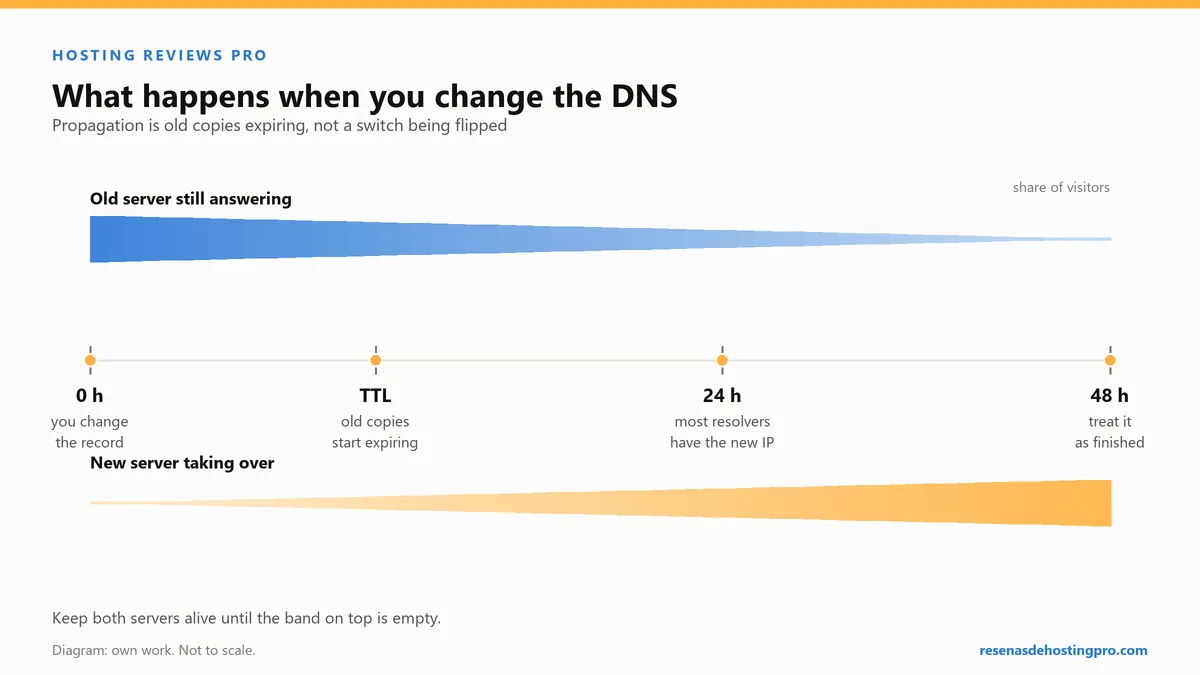
There is no broadcast and nothing propagates in the sense the word suggests. Resolvers around the world cached the old answer, each with its own countdown, and they will keep serving it until that countdown expires. That is the entire phenomenon.
You can watch it on your own machine. Measuring my sites on 20 September, one domain resolved in 0.071 s in one batch of requests and in about 0.006 s in the next batch, a couple of minutes later. Nothing changed on the internet in between: the answer was in my resolver’s cache the second time. Now imagine that cache holding a value for 24 hours, which is what a default TTL often is, and the waiting game explains itself.
So the no-downtime trick is boring and it works: a day before the change, lower the TTL on the records you are going to move to 300 seconds. Let the old, long TTL expire everywhere. Then make the change, and the world picks it up in five minutes instead of a day. Put the TTL back afterwards if you like.
Two things that change this picture. A nameserver change at the registry is not a record edit and can take longer, typically minutes to a few hours, occasionally up to a day or two. And leaving the old hosting running for a few days after you switch costs very little and means that whoever is still being sent to the old address sees a working site rather than an error.
Checking it from outside
Your browser is the worst possible instrument here: it caches, the operating system caches, and a hard refresh clears neither. Ask the DNS directly.
nslookup -type=NS example.com
nslookup -type=A  example.com
nslookup -type=MX example.com
nslookup -type=TXT example.com
Then check what is actually answering on the address, which is a different question from what the DNS says:
curl -sI https://example.com/ | head -5
echo | openssl s_client -servername example.com -connect example.com:443 2>/dev/null | openssl x509 -noout -issuer -enddate
The Server header tells you whose machine replied, and the certificate issuer tells you who terminated the connection. On my own sites those two lines are how I know at a glance whether I am talking to the host directly or to an edge in front of it.
If your domain contains a non-ASCII character, use the punycode spelling in these commands. Mine does, and half of my tooling refuses the pretty version outright — one of several consequences I did not think about at the point of purchase, which I set out in buying a domain: the trap nobody warns you about.
Four things that are not finished when it resolves
The certificate. Most hosts issue one automatically once the name points at them, but “issued” and “enforced” are different. Check that plain HTTP redirects to HTTPS, and while you are there, know that redirecting is not the same as instructing browsers never to try HTTP again. None of my five sites sends an HSTS header, which I checked in September and have not yet fixed, so I will not pretend it is a box I have ticked.
One canonical spelling. Pick www or the bare domain and 301 the other to it, at the host or at Cloudflare. Serving both is a split you will pay for in analytics and in search.
Search Console. If you verify by DNS TXT, that record now lives in whichever zone is authoritative — so a nameserver change is exactly when it disappears. Re-add it and re-verify, and if your domain is an internationalised one, expect the punycode host in the interface. The screens worth your time are in Search Console: the parts that actually matter.
Mail, tested from outside. Not from your own account. Send to the published address from something unconnected and confirm it arrives, and then reply and confirm that too.
Where this still catches me out
Two places, reliably. The first is the record I do not know exists because someone added it two years ago for a tool that is still running. The inventory step catches most of those and never all of them, which is the real argument for lowering TTLs: a fast reversal is worth more than a perfect plan.
The second is assuming that because the site loads for me, it works. It loaded for me while my own mail was going nowhere. Everything in this post that I got right, I got right after getting it wrong first — including the part about which registrar the name should be sitting at, which I go into in the three registrars I use, and where the renewal price hides.