

Loading this page took about six tenths of a second, and almost everything you pay a hosting company for happened inside it. That seems like a better starting point than the usual explanation about houses and street addresses, so let us take the request apart and see what each piece of it costs.
Everything below comes from my own account. This blog runs on a shared plan at Hostinger, alongside two other sites of mine, and the numbers are measurements of that plan rather than figures from a brochure.
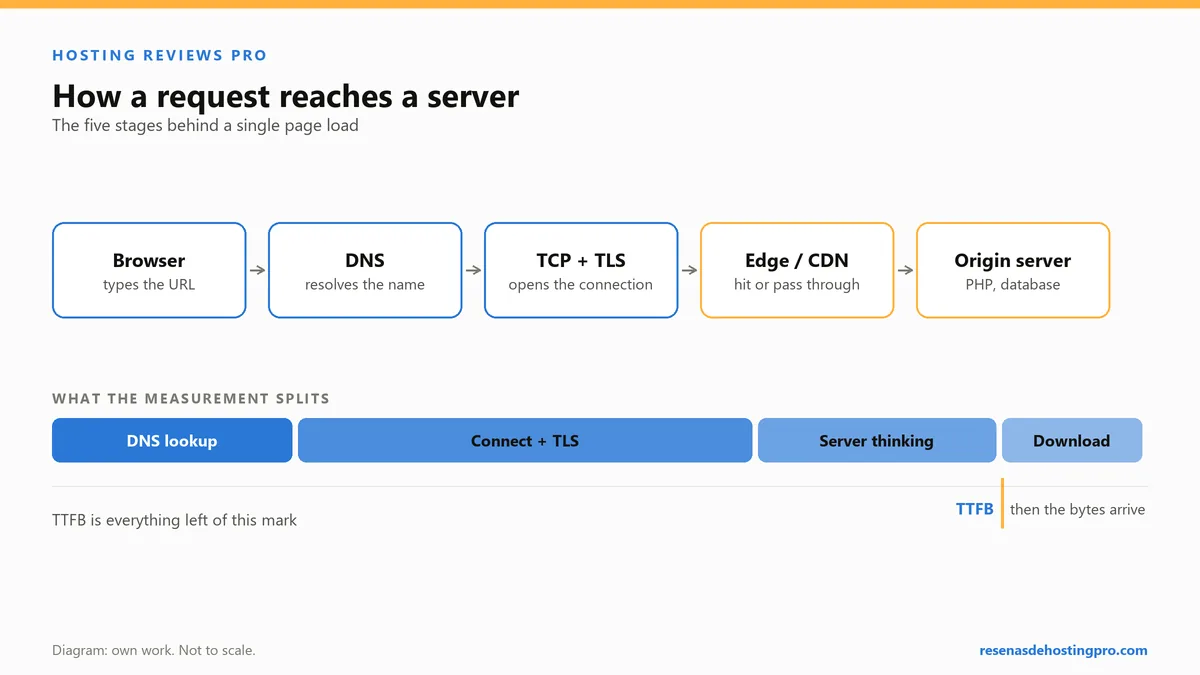
What happened before you saw a word
On 20 September 2026 I measured the home page of this site with curl, five times, roughly two seconds apart, from a home fibre line in Valencia, Spain. These are the median milestones, and each one is counted from the start of the request, so they add up rather than standing alone.
| Milestone | Elapsed | What was happening |
|---|---|---|
| Name lookup | 0.006 s | The domain turned into a server address |
| Connected | 0.067 s | My machine reached that server |
| Encryption ready | 0.236 s | The certificate was checked and the connection secured |
| First byte | 0.455 s | The server had built the page and started sending it |
| Everything received | 0.631 s | All 100,574 bytes of HTML had arrived |
Take that table for what it is. Five requests from one line on one day is a spot check, not a benchmark. It measures the HTML only, with no images, stylesheets or scripts, so it is not page speed and it has nothing to say about Core Web Vitals. And it measures a route, Spain to that server, not a provider: a reader in Texas would get different numbers on the same plan. It is still useful, because every line of it corresponds to something on your invoice.
Which parts the host is responsible for
The first step, turning the domain into an address, is not really hosting at all. That is DNS, and it works because a registrar holds the domain and some nameservers answer for it. It is often a separate purchase from a separate company, unless the two come bundled, and where I have the choice I keep them apart. The mechanics are in pointing a domain at a host.
The second step is the host: a machine that is on, connected and answering. That is the literal product.
The third is the certificate, which is why the padlock is there. Mine is from Let’s Encrypt, issued and renewed automatically by the panel, and it costs nothing extra. In 2026, a host charging for a basic certificate is telling you something about itself.
The fourth step is the interesting one. Between connecting and the first byte arriving, roughly two tenths of a second on that measurement, the server was running my site: PHP executing WordPress, WordPress querying a database, the result assembled into a page. A static site skips almost all of that. The response headers on this blog say Server: LiteSpeed and X-Powered-By: PHP/8.3.33, which is software I did not install and do not maintain, and that is a large part of what the monthly fee covers.
The last step is delivery. The page is 100,574 bytes of HTML, but only 26,886 bytes crossed the network, because the server compressed it. Compression is on by default and you will never think about it again.
Inside public_html
Open the file manager in any shared hosting panel and you land in a folder called public_html. Whatever is in that folder is your website. There is no more to it than that, and seeing it once removes most of the mystery.
wp-content, which holds your themes, your plugins and every image you have ever uploaded. This is the folder that is genuinely yours.wp-admin,wp-includesand thewp-*.phpfiles: WordPress itself, replaced wholesale at every update..htaccess, a small configuration file that decides redirects and routing. Small, powerful, and capable of taking the site down with one stray character.robots.txtand, if you run ads,ads.txt: plain text files in the root that other companies read.
What is not in that folder is the database, which lives separately and holds your posts, pages, settings and users. This catches people out constantly: copying the files somewhere else copies the theme and the images and nothing you have written. Files and database are two things, and a backup is only a backup when it has both.
What the panel does for you
The control panel is most of the perceived value of shared hosting. Mine is hPanel; other hosts use cPanel or something of their own, and the vocabulary differs more than the capabilities do. What you get is a button for each job that would otherwise be a command:
- Install WordPress without touching a database.
- Edit the DNS zone in a form instead of a text file.
- Create mailboxes on your own domain, with the mail records already pointing at the right place.
- Issue and renew the certificate.
- Change the PHP version from a dropdown.
- Take and restore a backup.
None of that is technically impressive and all of it is the reason a shared plan is the right first purchase. You are buying a layer of software that means you never meet the operating system.
What looks included and is not
Page caching. I assumed my plan cached pages because the server software is known for it. The headers on 20 September 2026 said otherwise: no page-cache header on any response, and a cache-busting request that came back no slower than a plain one. There was nothing cached to bust. Every visit was running PHP from scratch. The platform can cache; on WordPress, somebody has to install the plugin, and that somebody is you.
Security headers. None of the five sites I measured that day, spread across three kinds of hosting, sends Strict-Transport-Security. HTTPS works and redirects correctly everywhere, but that particular header is something a human adds, and no human had.
Knowing when the site is down. Nothing in a basic plan emails you when your site stops answering. Monitoring is a separate thing you set up, and every hour you spend without it is an hour your site might be off.
What you are limited to
Shared hosting pages publish the limits that are easy to understand. From Hostinger’s pricing page, read on 20 September 2026 on the 48-month term: Premium is $2.99 a month renewing at $10.99, with 3 websites, 20 GB of SSD, a domain for the first year and two mailboxes per site; Unlimited is $3.99 renewing at $16.99, with unlimited websites, 50 GB of NVMe and daily backups; Cloud Startup is $7.99 renewing at $25.99 with 100 GB. Note the renewal column. That is the price you will pay for most of the time you own the site, and the introductory price exists only if you pay for four years in advance.
The limits that decide whether your site survives a busy hour are different ones: how much processor time your account may use, how many requests it can process at once. They were not on any of the shared hosting pricing pages I read that day. They exist, they are usually documented somewhere in a knowledge base, and “unlimited bandwidth” on a plan with a firm processor ceiling is not the promise it appears to be. Some of that matters more than it sounds, which is why I keep a checklist for reading these pages before I sign anything.
Three things beginners ask me
Do I need to buy the domain from the same company?
No, and I do not. Hosting plans often include a domain for the first year, which is convenient and fine. Keeping the domain at an independent registrar means a dispute with your host is never a dispute about your address, and moving the site becomes a DNS change rather than a negotiation.
Is a more expensive plan faster?
Not reliably, and not in the way people imagine. On the measurements above, the slowest part of loading my blog was my own WordPress install building the page, not the network and not the disk. More storage does not fix that; caching, fewer plugins and lighter pages do. Buy a bigger plan when you hit a limit you can name.
Can I move later without losing anything?
Yes. Files and database are portable and every host wants your business. The part that goes wrong is not the move, it is the addresses you leave behind: I left an entire old version of this site live for months without noticing, which I wrote about in moving a site without leaving old URLs behind.
When a shared plan stops being the answer
Two directions, and neither is about traffic.
Downwards: if the site is genuinely static, with no database and no PHP, a shared plan is more machinery than you need. One of my own sites is a static site on Cloudflare Pages, and on that same set of measurements it went from request to complete in 0.283 seconds, with the free plan covering it comfortably. There is a real catalogue of free hosting that is worth using, and it is not the kind with adverts injected into your pages.
Upwards: if you need something running permanently, an application rather than a website, shared hosting is not built for it and you end up on a server of your own. That is a different purchase with a different amount of work attached, and I compare the two plans I pay for side by side in shared or VPS, running both.
For everything in between, which is most blogs and most small business sites, a shared plan is the correct answer and has been for twenty years. What you are buying is a folder, a database, a certificate, some software you never have to install, and someone else’s responsibility for the machine. Knowing which of those five you are actually short of is the whole skill.