
The app had been live for two days, with a valid certificate and every check I had written passing, when an iPhone refused to open it. Safari said the connection was not private. That afternoon is the reason this page is not a list of VPS providers ranked out of five, because the thing that decides whether a VPS works for you is not which company sold it to you. It is whether you are willing to spend an afternoon like that one.
I run exactly one VPS: a Hostinger KVM 1, with a small Node and Express application on it that I wrote myself. Everything below is that box. Where I talk about other providers, further down, I say plainly that I am reading their pricing pages rather than their panels.
The machine, and what it costs
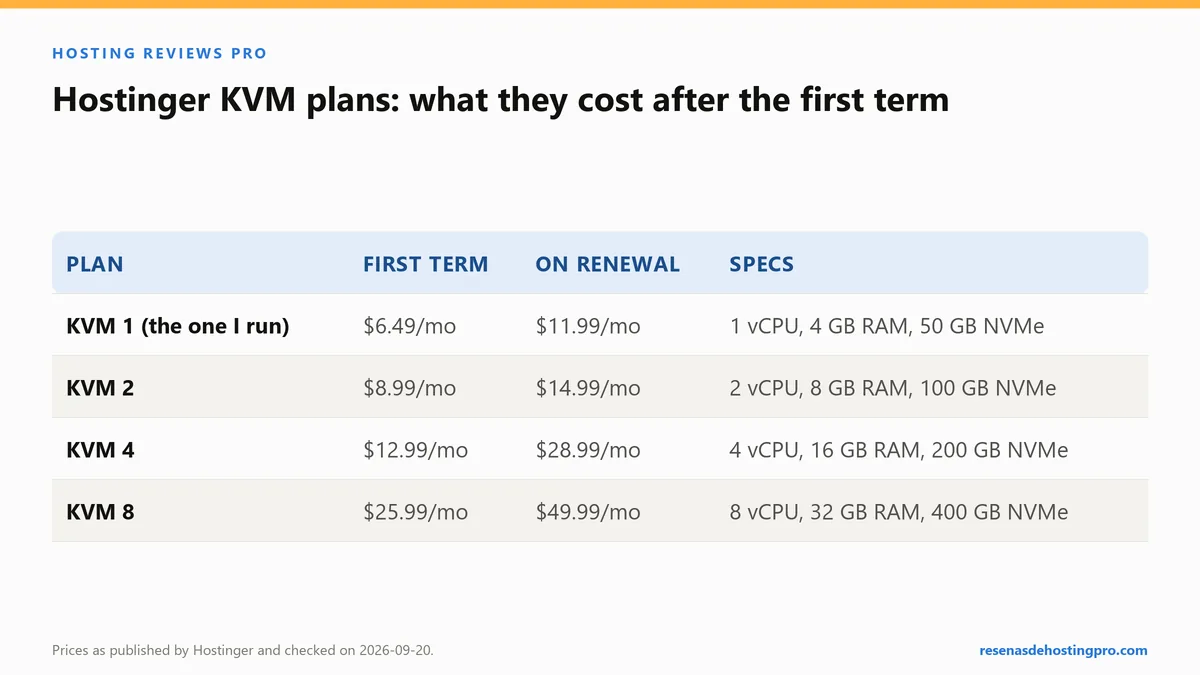
One vCPU, 4 GB of RAM, 50 GB of NVMe and 4 TB of transfer. Listed at $6.49 a month on a 24-month prepaid term and renewing at $11.99, per hostinger.com/vps-hosting, checked 20 September 2026.
Now put that next to the shared plan on the same account, which renews at $10.99. About a dollar a month separates them. If you came to VPS hosting looking for a cheaper bill, you can stop reading: the money is roughly the same and the workload is not. What you are buying is root, and root is a responsibility before it is a feature. The side-by-side of what each plan actually demands of me is in shared or VPS, since I run both.
What I installed, in the order I installed it
- Ubuntu 24.04, chosen from the images the panel offers.
- SSH by key rather than by password, with the public key added through the provider’s panel.
- A dedicated, unprivileged user for the application, so the Node process never runs as root.
- Node 22 and the app itself, listening on a local port that nothing outside talks to directly.
- Caddy in front of it as the reverse proxy, which is also what obtains the certificates, for the bare domain and for www.
- A systemd unit for the app, so it starts on boot and restarts when it falls over.
Written out like that it looks like an evening’s work, and it was: I had scripted the install beforehand, so most of it ran by itself. It was step five, two days later, that took the next afternoon.
The certificate is where people get stuck
Caddy’s selling point is that it obtains and renews a Let’s Encrypt certificate for you, automatically, the first time it serves a hostname it has been configured for. Mine did exactly that on launch night, for both names, and nothing complained.
What it obtained, by default, was an ECDSA certificate, and the chain behind it led up to ISRG Root X2. Two days later an iPhone refused the site with Safari’s “This connection is not private” warning, while the checks I ran from my own machine kept passing. As far as I could establish, that phone did not trust the root at the top of that chain. The failure was quiet in the way infrastructure failures usually are: nothing on the server was wrong, and nothing on the server said so.
The fix was a key_type rsa2048 setting in the Caddyfile for both hostnames, then deleting the certificates Caddy had already stored and restarting it. It came back with an RSA certificate whose chain ends at ISRG Root X1, and the warning went away. On 20 September 2026 the box was still serving that certificate, issued through the YR2 intermediate and valid to 21 November 2026. On the next server I set up with Caddy, that line goes in on day one.
None of that is what tutorials warn you about. They warn you about issuance, fairly, because issuance needs four things in place before Caddy asks. All four were right on my box, which is why the first certificate arrived without drama:
- The DNS record for the hostname already pointing at this machine, and already propagated, before Caddy asks for the certificate. Not at the same time. Before. Getting that order right is most of the job, and I wrote up how I sequence DNS changes in pointing a domain at your host without downtime.
- Port 80 reachable from the public internet, not just port 443. The validation request arrives on 80.
- Nothing else already bound to those ports, which on a fresh box is usually a default web server you did not know was installed.
- The service log, read properly. On a systemd box that is
journalctl, and if you are not comfortable there you are going to have a bad time with a VPS generally, not just with certificates.
Worth saying out loud: on the shared plan in the same account, this entire section does not exist. Certificates appear, renew and expire without ever reaching my attention. That contrast is the real subject of managed versus unmanaged, and what I have to do myself.
systemd is what turns it into a server
An application you started by hand over SSH dies when you close the terminal, and does not come back after a reboot. A twenty-line systemd unit fixes both, and until you have written one you do not really have a server, you have a computer that happens to be on.
You can read the result off the response headers today: Via: 1.1 Caddy for the proxy, X-Powered-By: Express for the app behind it, Cache-Control: public, max-age=0 because I have not thought hard about caching for something with no traffic yet.
On 20 September, over five requests from home fibre in Valencia, Spain, the median time to first byte was 0.304 s as a visitor would get it, and 0.240 s with a cache-busting parameter forcing the origin. Before anyone puts that in a comparison table: the page it is serving is 1,531 bytes of HTML with no database query behind it. It is the lightest thing I own by a factor of sixty, and a fast number on a nearly empty page proves nothing about the hardware.
What is still not done on my box
This is the section a VPS round-up never has, because a round-up is written by someone who did not have to live with the thing afterwards. Every item here is a job with my name on it.
- No HTTP/3. Caddy supports it. My box does not advertise
h3in itsalt-svcheader, while all three of my Hostinger shared sites do. The usual cause is UDP 443 not being open, and the point is not that it is hard to fix, it is that nobody is going to fix it for me or even tell me it is missing. - No HSTS. None of my sites sends
Strict-Transport-Security. On shared hosting I can at least shrug at the platform. Here it is one line in a Caddyfile that I have not written. - gzip, not Brotli. The app compresses to 699 bytes with gzip while my other sites are served with Brotli. Nothing broke; I simply never configured it.
- No off-box backup of the data. The code and the server configuration live on my own machine, because I deploy from there. The database the app writes to lives on the VPS and, as far as I have set anything up, nowhere else. Anything the provider keeps at its end sits at the same company as the machine, which makes it a convenience rather than a backup.
- No uptime history worth quoting. I do not have thirty days of monitoring on this machine, so there is no availability figure anywhere on this page, and there will not be one until there is data behind it. The rule, and why five-minute checks cannot see short outages, is in how to read a hosting uptime guarantee.
The recurring part of the bill
On the published 24-month term the money is $6.49 a month and then $11.99. The larger cost is attention, and attention recurs:
- Operating system and package updates, which nobody applies for you, including the security ones.
- Watching the certificate, at least until you have seen it renew itself once. Mine has not been through a renewal yet.
- Watching disk space, because a log file nobody rotates will eventually fill 50 GB and take the site down in a way that looks like a mystery.
- Reading logs when something returns a 502, which on a reverse-proxy setup means working out whether the proxy or the app is the one that died.
On the shared plan, that list is empty. That is the trade in one sentence: the VPS gives you control over things you did not previously have to think about, and control is indistinguishable from homework until something needs doing that shared hosting will not let you do.
The other providers, and why this page does not rank them
I have administered one VPS, at one provider. Anything I wrote here about Hetzner, DigitalOcean, Vultr or Linode would be a rewrite of their marketing pages with my byline on it, and you can read their marketing pages yourself. So instead, the only ladder I can source properly: the rest of the range on the provider I do use, which is also the sizing question most people are actually asking.
| Plan | Entry price | Renewal | Specification |
|---|---|---|---|
| KVM 1 | $6.49/mo | $11.99/mo | 1 vCPU, 4 GB RAM, 50 GB NVMe, 4 TB transfer |
| KVM 2 | $8.99/mo | $14.99/mo | 2 vCPU, 8 GB RAM, 100 GB NVMe, 8 TB |
| KVM 4 | $12.99/mo | $28.99/mo | 4 vCPU, 16 GB RAM, 200 GB NVMe, 16 TB |
| KVM 8 | $25.99/mo | $49.99/mo | 8 vCPU, 32 GB RAM, 400 GB NVMe, 32 TB |
Two things to notice. The renewal roughly doubles on the small plans and more than doubles on the KVM 4, so the term discount is doing real work. And the specifications climb much faster than most projects do: a single Node app and a database that fits in memory is a KVM 1 job, and buying a KVM 4 for a site with no traffic buys you nothing but a larger bill in month twenty-five.
Referral link
The VPS described here runs on the account behind my Hostinger referral link. Using it gives you 20% off and pays me a 20% commission, at no extra cost to you. It changes nothing about what is written above: the prices and the measurements are the same ones I would publish without it. How this site is funded is on the affiliate disclosure page.
Who should not buy one
If you are running WordPress and a plugin update is already something you postpone, a VPS will not improve your week. If you would not be comfortable reading a service log to find out why a site is down, the first outage will cost you more in stress than four years of the price difference. And if the only reason you are considering one is that someone told you shared hosting is slow, measure your own site first, because on my own blogs the thing making pages slow was a missing cache, not the hardware. What a shared plan is genuinely doing for you, including the parts I only noticed once I had to do them myself, is in my review of the shared account those three sites live on.
Buy one when you need something the shared plan structurally cannot give you: your own runtime, a long-running process, a port, a daemon. That is a real reason. Saving a dollar is not.